CV templates
CV template in Word: an editable CV you can update any time
Updated 2 November 2026 · By the AfriCV career team
Many employers and recruitment agencies in Africa still ask for a CV in Microsoft Word. A Word CV lets them add notes, remove your contact details before sending you to a client, or copy your experience into their own forms. It also lets you make quick changes yourself without rebuilding the whole document.
The trouble is that most free Word templates online are built with tables, text boxes and pictures. They look fine on the designer's computer but fall apart when you open them on another device or upload them to an online application system. This guide explains how to get a clean, editable CV template in Word that keeps its shape, and shows a full sample CV you can copy.
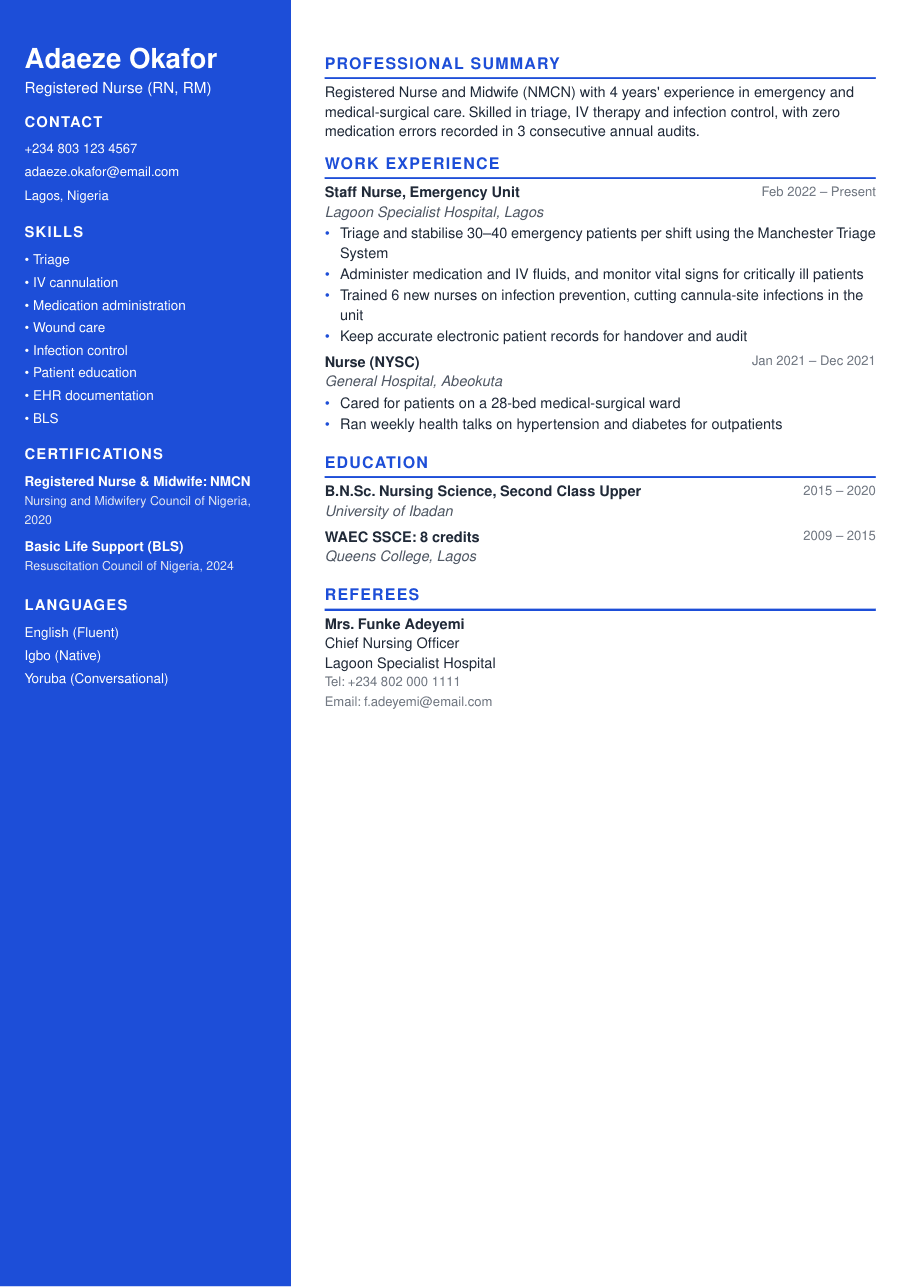
Sample CV · Modern design · ATS-friendly
Read this sample CV as text
Adaeze Okafor
Registered Nurse (RN, RM)
Lagos, Nigeria · adaeze.okafor@email.com · +234 803 123 4567
Professional Summary
Registered Nurse and Midwife (NMCN) with 4 years' experience in emergency and medical-surgical care. Skilled in triage, IV therapy and infection control, with zero medication errors recorded in 3 consecutive annual audits.
Work Experience
Staff Nurse, Emergency Unit, Lagoon Specialist Hospital (Feb 2022 – Present)
- Triage and stabilise 30–40 emergency patients per shift using the Manchester Triage System
- Administer medication and IV fluids, and monitor vital signs for critically ill patients
- Trained 6 new nurses on infection prevention, cutting cannula-site infections in the unit
- Keep accurate electronic patient records for handover and audit
Nurse (NYSC), General Hospital (Jan 2021 – Dec 2021)
- Cared for patients on a 28-bed medical-surgical ward
- Ran weekly health talks on hypertension and diabetes for outpatients
Education
- B.N.Sc. Nursing Science, Second Class Upper, University of Ibadan (2015 – 2020)
- WAEC SSCE: 8 credits, Queens College, Lagos (2009 – 2015)
Skills
Triage · IV cannulation · Medication administration · Wound care · Infection control · Patient education · EHR documentation · BLS
Certifications
- Registered Nurse & Midwife: NMCN, Nursing and Midwifery Council of Nigeria, 2020
- Basic Life Support (BLS), Resuscitation Council of Nigeria, 2024
Why Word CV templates break (and how to avoid it)
Word is a word processor, not a design tool. When a template uses floating text boxes, shapes or images to create columns and coloured bars, small differences between versions of Word, Google Docs, LibreOffice or a phone app move those elements around. Your carefully aligned CV turns into overlapping text.
Applicant tracking systems have the opposite problem: they often ignore text inside text boxes, headers and images completely. A recruiter searching for “QuickBooks” or “IV cannulation” may never find you, even if those words are on your CV.
- Use normal paragraphs and real bullet points, not text boxes.
- Keep your name and contact details in the body of the document, not only in the Word header area.
- Avoid tables for layout. If you must use one, keep it simple and never nest tables.
- Use a standard font such as Calibri, Arial or Times New Roman at 10–12 pt.
- Save the final version as both .docx and PDF; send whichever the employer asks for.
How to get an editable Word CV in 10 minutes
- 1
Build your CV online
Fill in our simple form section by section. You see a live preview as you type, and you can try any of the 23 designs without retyping anything.
- 2
Pick a design for the PDF
Choose the look you want for your PDF. The Word export uses a clean single-column structure based on your chosen font and colour, so it opens correctly everywhere.
- 3
Unlock Word download
The Standard plan unlocks both a clean PDF and the .docx file for that CV, forever. You can re-download after every change.
- 4
Open it in Word or Google Docs
The file uses real headings and bullet lists, so you can edit, add or delete lines without the layout breaking. Google Docs users can upload the .docx and keep editing in the browser.
What to include in a Word CV template
A Word CV should follow the same structure recruiters expect from any professional CV. Use this order unless you are a student or career changer:
- Header: full name, professional title, phone with country code, email, town and country, LinkedIn.
- Professional summary: three to four lines tailored to the job.
- Work experience: most recent first, with achievements, not just duties.
- Education: degree, diploma or certificate, institution and year. Add school results (KCSE, WASSCE, Matric) if you are early in your career.
- Skills: 8–14 specific skills that match the advert.
- Certifications and licences: professional bodies, licences and short courses with dates.
- Languages and referees: most employers in Kenya, Nigeria and Ghana still expect two or three referees.
Make yours in 10 minutes
Design your CV free on any phone. Choose from 50+ designs, see a live ATS score, and let AI write it from a job link. Download from KES 20 / ₦200 / GH₵2 / R3.
Create my CVWord or PDF: which should you send?
Send what the employer asks for. If the advert says nothing, a PDF is the safest choice because it looks identical on every screen. Send Word when a recruitment agency requests it, when an online form only accepts .doc or .docx, or when a hiring manager wants to edit or forward your CV.
It is perfectly fine to keep both. Name them clearly, for example Adaeze_Okafor_CV.pdf and Adaeze_Okafor_CV.docx, so you always attach the right one.
Formatting tips for CVs edited in Word
Margins and spacing
Use margins between 1.5 cm and 2.5 cm. Add a little space before each section heading instead of pressing Enter several times; it keeps the layout stable when you edit.
Headings
Use Word's built-in Heading styles for section titles. They help screen readers and ATS software understand your structure, and you can restyle all headings at once.
Bullets
Use Word's bullet list button rather than typing dashes. Keep bullets to one or two lines each and start every bullet with a strong verb such as led, built, reduced, trained or managed.
File size and name
Remove unused images and keep the file under 1 MB. Many portals reject larger files or files with special characters in the name.
Walkthrough: the sample Word CV on this page
The nurse CV above shows how a Word-friendly CV is organised. The title line (“Registered Nurse (RN, RM)”) tells the recruiter the exact role in a single glance. The summary includes the licence, the specialism and a measurable quality result, so it works even if the reader stops after three lines. Experience entries use the same pattern every time (title, employer, location, dates, then bullets), which is what makes the document survive editing in Word: there are no tables to break and nothing floats.
Certifications sit in their own section with the issuing body and year, so an HR officer verifying licences can find them instantly, and the languages line supports applications to multilingual hospitals. When you download the Word version, each of these blocks becomes normal headings and bullet lists that you can extend without the layout shifting.
Using a Google Docs CV template
If you do not have Microsoft Word, upload the .docx to Google Drive and open it with Google Docs. Everything in our export (headings, bullets, bold text and colours) converts cleanly. When you are done, use File → Download → PDF to create a PDF copy. Avoid Google Docs templates that rely on tables for two columns if you plan to apply through online portals.
Frequently asked questions
Can I edit the Word CV after downloading?
Yes. The .docx is fully editable in Microsoft Word, Google Docs and LibreOffice.
Is a Word CV ATS-friendly?
Ours is. It uses real headings and bullet points with no text boxes or images, which is what ATS software reads best.
How do I convert my Word CV to PDF?
In Word use File → Save As → PDF. In Google Docs use File → Download → PDF document. Or download the PDF directly from your CV builder.
Why does my Word CV look different on another computer?
Usually because of missing fonts or floating text boxes. Use standard fonts and normal paragraphs, or send a PDF.
Ready to apply?
Start from a ready-made sample for your career, check your ATS score as you type, and download a clean PDF when you're happy. Pay with M-Pesa, mobile money or card.
Start my CV