CV templates
ATS CV template: make sure the software reads your CV
Updated 2 November 2026 · By the AfriCV career team
Before a person reads your CV, there is a good chance software does. Large employers, banks, NGOs, multinationals and many recruitment agencies in Kenya, Nigeria, Ghana and South Africa use applicant tracking systems (ATS) to collect applications, pull out your details and help recruiters search for candidates. If the ATS cannot read your CV properly, your experience may never be seen.
This guide explains what an ATS-friendly CV is, the formatting rules that matter, how to use keywords honestly, and gives you a free ATS CV template with a full sample. Sixteen of our 23 designs are marked ATS-safe because they follow every rule below.
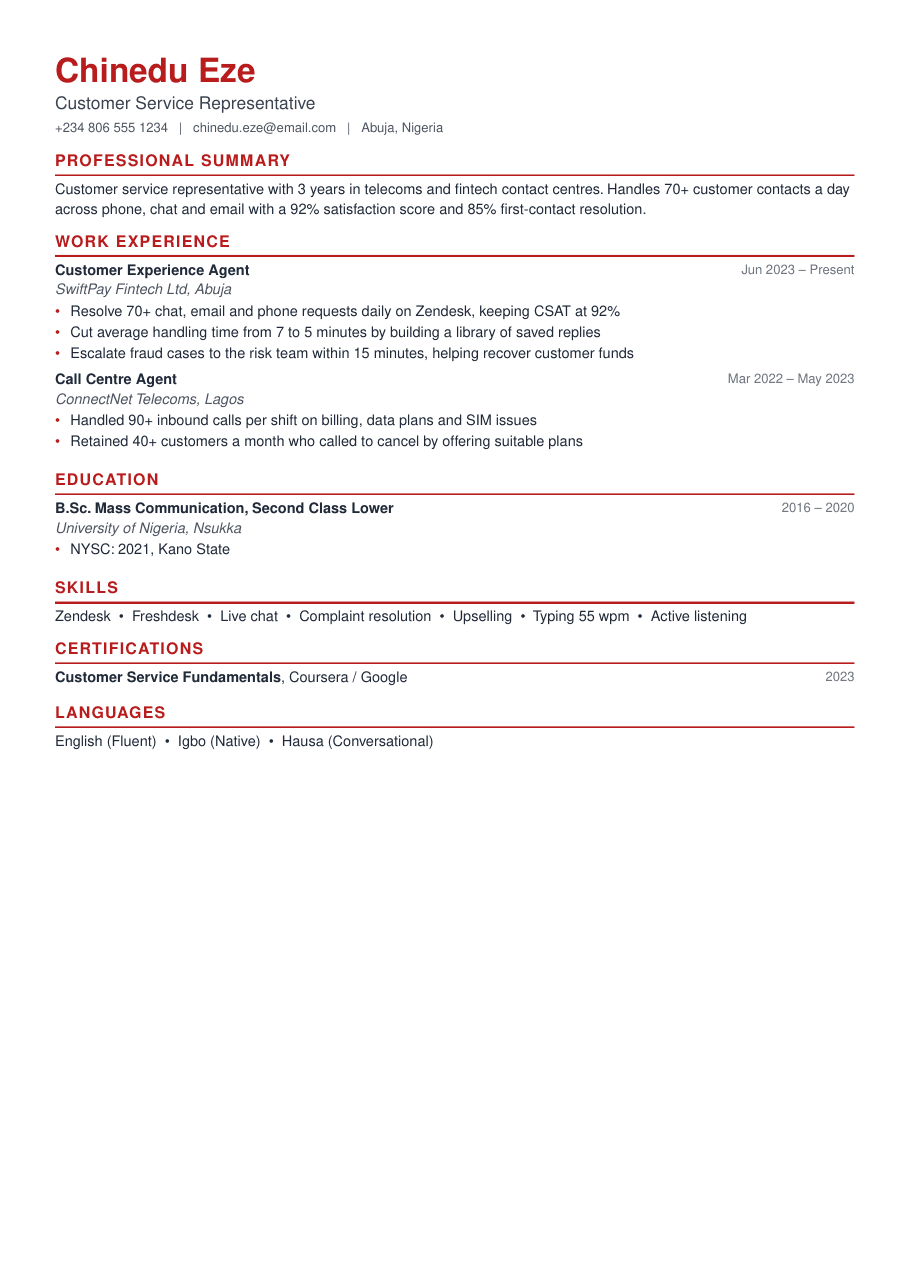
Sample CV · Classic design · ATS-safe
Read this sample CV as text
Chinedu Eze
Customer Service Representative
Abuja, Nigeria · chinedu.eze@email.com · +234 806 555 1234
Professional Summary
Customer service representative with 3 years in telecoms and fintech contact centres. Handles 70+ customer contacts a day across phone, chat and email with a 92% satisfaction score and 85% first-contact resolution.
Work Experience
Customer Experience Agent, SwiftPay Fintech Ltd (Jun 2023 – Present)
- Resolve 70+ chat, email and phone requests daily on Zendesk, keeping CSAT at 92%
- Cut average handling time from 7 to 5 minutes by building a library of saved replies
- Escalate fraud cases to the risk team within 15 minutes, helping recover customer funds
Call Centre Agent, ConnectNet Telecoms (Mar 2022 – May 2023)
- Handled 90+ inbound calls per shift on billing, data plans and SIM issues
- Retained 40+ customers a month who called to cancel by offering suitable plans
Education
- B.Sc. Mass Communication, Second Class Lower, University of Nigeria, Nsukka (2016 – 2020)
Skills
Zendesk · Freshdesk · Live chat · Complaint resolution · Upselling · Typing 55 wpm · Active listening
Certifications
- Customer Service Fundamentals, Coursera / Google, 2023
What is an ATS and how does it read your CV?
An applicant tracking system is software that stores job applications. When you upload a CV, the ATS extracts the text, tries to identify sections such as experience and education, and saves fields like your name, email, job titles and skills. Recruiters then filter and search those fields, for example “show me candidates with CPA and IFRS” or “nurses with BLS in Lagos”.
The ATS does not reject you because your CV is ugly. Problems happen when it cannot read parts of your CV (text in images, odd columns, text boxes) or when your CV does not contain the words recruiters search for. An ATS-friendly CV solves both problems.
ATS CV formatting rules
- Use a single-column layout for online portals. Multi-column designs can be read left-to-right across columns, mixing up your content.
- Use standard headings: Professional Summary, Work Experience, Education, Skills, Certifications, Languages, Referees.
- Keep all text as real text. No text inside images, logos, charts or icons.
- Put contact details in the main body, not only in the page header or footer.
- Use common fonts such as Helvetica, Arial, Calibri or Times, at 10 pt or more.
- Avoid tables and text boxes for layout.
- Write dates consistently, e.g. “Mar 2022 – Present”.
- Save as PDF or .docx, whichever the portal asks for. Both are readable when built correctly.
How to use keywords in an ATS CV (without keyword stuffing)
- 1
Collect keywords from the advert
Highlight the skills, tools, qualifications and job titles in the job advert. These are the words recruiters will search for.
- 2
Match the exact wording
If the advert says “Microsoft Excel”, write “Microsoft Excel”, not just “spreadsheets”. Include both the abbreviation and the full term once, e.g. “Monitoring and Evaluation (M&E)”.
- 3
Place keywords where they make sense
Put the most important ones in your title, summary and skills section, then show them in action inside your experience bullets.
- 4
Never claim what you cannot do
Recruiters and interviewers will test you. Only include keywords for skills you genuinely have.
- 5
Check what is missing
Our CV check compares your CV with a job advert and lists the important keywords you have missed.
Make yours in 10 minutes
Design your CV free on any phone. Choose from 50+ designs, see a live ATS score, and let AI write it from a job link. Download from KES 20 / ₦200 / GH₵2 / R3.
Create my CVATS-safe vs ATS-friendly designs
We label every design so you can choose with confidence. ATS-safe designs (Classic, Harvard, Engineer, Minimal, Executive, Corporate, Accra, Kigali, Kampala, Addis, Cairo, Abuja, Mombasa, Gaborone, Durban and Graduate) are single column and follow every rule above. ATS-friendly designs (Modern, Nairobi, Lagos, Cape Town, Dakar, Lusaka and Kinshasa) use real text but add a sidebar; they are perfect when emailing a CV directly to a person, but for large online portals choose an ATS-safe design.
Because your content is stored separately from the design, you can keep a two-column version for emailing and switch to an ATS-safe version for portals in one click.
Myths about ATS CVs
“ATS rejects 75% of CVs automatically”
Most ATS tools do not automatically reject CVs for design. Recruiters set filters and search. A readable CV with the right keywords simply makes you easier to find.
“You must use white text to hide keywords”
Never do this. Recruiters see it when they copy your CV, and it destroys trust instantly.
“ATS can't read PDFs”
Modern ATS software reads text-based PDFs well. Problems come from scanned PDFs or images, not PDFs themselves.
Walkthrough: the ATS-safe sample CV
The customer service CV above is built to be read perfectly by software. It is a single column, the headings are the standard words an ATS expects (Professional Summary, Work Experience, Education, Skills, Certifications, Languages), and every piece of text is selectable. The contact details are in the body of the page, not in a header graphic.
It also contains the keywords a customer service advert typically uses: Zendesk, Freshdesk, live chat, complaint resolution, CSAT and first-contact resolution, each backed up by a result in the experience section. A recruiter searching their ATS for “Zendesk” or “customer satisfaction” will find this CV, and when they open it they will see numbers that prove the skills are real.
How our live ATS score works
While you edit, the score checks the things ATS software and recruiters care about: complete contact details, a professional email, a title under your name, a summary of the right length, 8–14 skills, achievements with numbers, bullets that start with action verbs, dates on every job, a sensible length and an ATS-safe layout. Paste a job advert in the Tailor & check tab and it also measures how many of the advert's important keywords appear in your CV. You see a rating of Poor, Fair, Good or Excellent and a list of the exact fixes to make.
ATS CV checklist before you apply
- Single column, standard headings, real text.
- Job title and summary match the advert.
- Key skills and tools from the advert are included (where true).
- Every job has dates, employer and location.
- File named clearly: Firstname_Lastname_CV.pdf.
- Spelling checked, phone number with country code, professional email.
Frequently asked questions
What is an ATS-friendly CV?
A CV that applicant tracking software can read correctly: single column, standard headings, real text and keywords that match the job.
Is a two-column CV ATS-friendly?
Many modern ATS can read it, but some older systems mix up the columns. Use a single-column design for online portals.
Should I send my ATS CV as PDF or Word?
Either works if it is text-based. Follow the employer's instructions; if there are none, send PDF.
How do I know which keywords to use?
Use the skills, tools and qualifications named in the job advert, and run our CV check to see which important ones are missing.
Ready to apply?
Start from a ready-made sample for your career, check your ATS score as you type, and download a clean PDF when you're happy. Pay with M-Pesa, mobile money or card.
Start my CV